
Digital signage, minus the drama
Every screen you own, run from one dashboard
Design content, schedule it, and publish to TVs, kiosks, LED walls and menu boards, then prove it played.
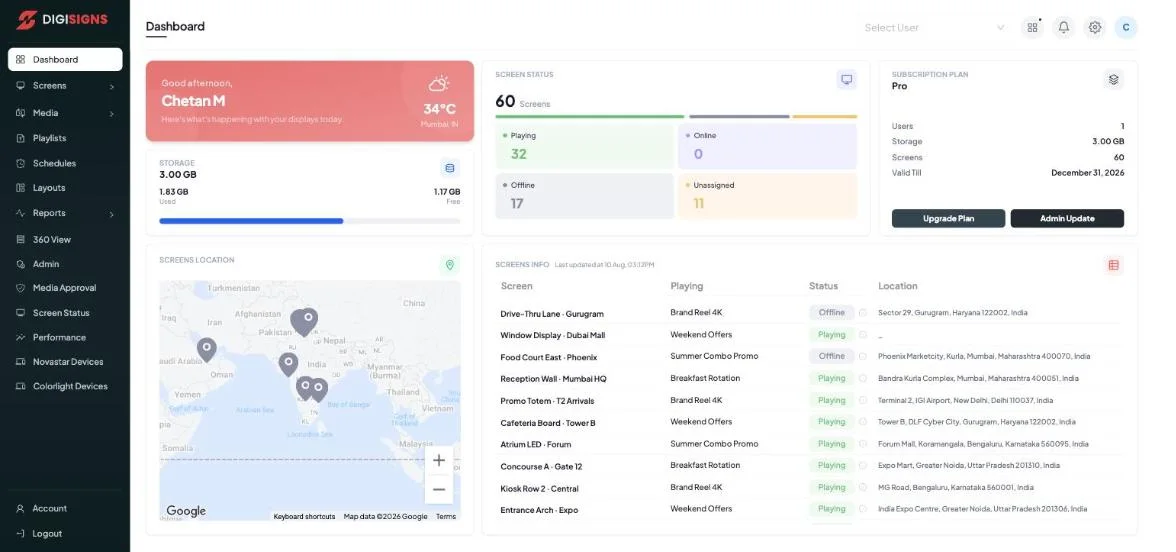
One dashboard. Every screen OS.
 Android
  Windows
  Samsung Tizen
  LG webOS
  NovaStar
  Colorlight
  ChromeOS
  Linux
Linux  macOS
macOS  Web Player
 Command your screens like a fleet
Everything between an idea and a pixel on glass: media, layouts, schedules, device control and the receipts to prove playback.
Publish in seconds
Push playlists, layouts, web pages or a single file to one screen, a group, or every screen in the company, updates land via instant cloud push.
Learn moreSchedules that run themselves
Daily, weekly, monthly or custom recurrence per playlist and per item. Breakfast flips to lunch at 11:30 without anyone touching a screen.
Learn moreStudio layouts & 14 widgets
Split any screen into zones and drop in live weather, clocks, RSS, YouTube, Power BI dashboards, Instagram feeds, tickers and countdowns.
Learn moreRemote device control
Restart, schedule power, set brightness and volume, grab live screenshots and check uptime timelines, for one screen or a thousand, from your desk.
Learn moreProof-of-play analytics
Per-screen play logs, playback hours, most-played media and exportable reports, evidence your content ran, not hope that it did.
Learn moreEnterprise-grade guardrails
ISO 27001 certified, GDPR-ready, VAPT tested. 2FA, role-based access, scoped sub-users, media approval queues and full audit logs.
Learn moreFour products. One platform.
Start with signage, then add menus, ordering and wayfinding as your screens take on bigger jobs, same account, same dashboard.
Studio
Layout DesignerA Canva-style canvas for screens: drag in text, video, playlists and 14 live widgets, weather, clocks, RSS, Power BI, Instagram, then split the screen into zones. Any resolution, portrait or landscape.
Explore StudioDigiMenu
Menu BoardsMenu boards that mirror your POS. 12 integrations, instant price pushes, sold-out auto-hide, veg/non-veg markers, QR menus and print-ready exports from the same menu data.
Explore DigiMenuDigiEats
Ordering KiosksSelf-service ordering for cinemas and counters: kiosk, scan-at-seat QR and pay-later modes, with a live kitchen display and per-mode pricing built in.
Explore DigiEatsDigiMaps
WayfindingInteractive 3D maps and directories with step-free routing, multilingual search, kiosk attract loops and QR handoff to a visitor’s phone.
Explore DigiMaps- 10.
- player platforms, one dashboard
- 14.
- live widgets in Studio layouts
- 12.
- POS systems synced by DigiMenu
- 14-day.
- free trial, no credit card
Live in three steps
- 1
Pair your screens
Install the player on any of 10 platforms, or open the web player, and enter the on-screen code. The screen appears in your dashboard, geolocated and grouped.
- 2
Create or import content
Upload media, import from YouTube, Google Drive or Dropbox, or design multi-zone layouts in Studio with live widgets.
- 3
Schedule & prove it
Publish now or on a schedule. Proof-of-play logs, uptime timelines and offline alerts keep every screen honest.
Industries
Screens speak every industry's language
From drive-thru lanes to hospital lobbies, see the setups teams in your sector deploy.
“Digital signage is the use of screens, TVs, kiosks, LED walls, controlled by software to show scheduled content: menus, promotions, dashboards and announcements, updated remotely instead of printed.”Read the complete guide
Questions people ask before starting
What is Digisigns?
How much does Digisigns cost?
Does Digisigns work on the TVs I already own?
Can menu boards update automatically from my POS?
What happens if a screen goes offline?
Is Digisigns secure enough for enterprise use?
Put your screens to work today
Free for 14 days on every plan. No credit card required, go live in minutes.
ISO 27001 certified · GDPR ready. Works on Android, Windows, Tizen, webOS and more.